Restore Azure Multi NIC VM from Backup

Sharing is caring!

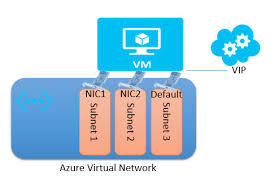
<div dir&equals;"ltr" style&equals;"text-align&colon; left&semi;"><b>Prerequisites&colon;<&sol;b><&sol;p>&NewLine;<p>Source VM must be deleted prior to running the script or the network card mapping will fail&period; And this will be due to the network interfaces being in use on the source VM&period;<&sol;p>&NewLine;<div style&equals;"clear&colon; both&semi; text-align&colon; center&semi;"><a href&equals;"http&colon;&sol;&sol;www&period;thecloudxperts&period;co&period;uk&sol;wp-content&sol;uploads&sol;2017&sol;10&sol;download&period;jpg" style&equals;"margin-left&colon; 1em&semi; margin-right&colon; 1em&semi;"><img border&equals;"0" data-original-height&equals;"183" data-original-width&equals;"275" src&equals;"http&colon;&sol;&sol;www&period;thecloudxperts&period;co&period;uk&sol;wp-content&sol;uploads&sol;2017&sol;10&sol;download&period;jpg" &sol;><&sol;a><&sol;div>&NewLine;<p>The script below will perform the following steps&colon;<&sol;p>&NewLine;<p>&nbsp&semi; &nbsp&semi; Enumerate and list for selection available replicas of the named VM on given Vault Name<br &sol;>&nbsp&semi; &nbsp&semi; Upon selecting desired replica&comma; vhd or vhd’s will be place on selected storage account<br &sol;>&nbsp&semi; &nbsp&semi; JSON file will be download to a configured temp location and enumerated for VM type and network config<br &sol;>&nbsp&semi; &nbsp&semi; VM will then be created with the configuration built from the JSON file&period;<&sol;p>&NewLine;<p>Should you do a restore to disk&comma; the script below can be adjusted to build the VM using the disks from the restore&period;<&sol;p>&NewLine;<p><b>Script to restore as VM<&sol;b><&sol;p>&NewLine;<p>&num;&num;&num; START SCRIPT &num;&num;&num;<&sol;p>&NewLine;<p>&num;&num;&num;&num; Login to Azure subscription<&sol;p>&NewLine;<p>Login-AzureRmAccount<&sol;p>&NewLine;<p>&num;&num;&num;&num; Define variables<&sol;p>&NewLine;<p>&dollar;VaultName &equals; &&num;8220&semi;TestRecovery2&&num;8221&semi; &num; Vault Name for Recovery Points &lpar;Backups&rpar;<&sol;p>&NewLine;<p>&dollar;VmName &equals; &&num;8220&semi;FM032017-02&&num;8221&semi; &num; VM Name of the backup to be used<&sol;p>&NewLine;<p>&dollar;StAcName &equals; &&num;8220&semi;testrecoverydisk02&&num;8221&semi; &num; Storage Account Name to be used for recovery<&sol;p>&NewLine;<p>&dollar;StAcRGName &equals; &&num;8220&semi;TestRecovery2&&num;8221&semi; &num; Storage Account Resource Group Name<&sol;p>&NewLine;<p>&dollar;Region &equals; &&num;8220&semi;West Europe&&num;8221&semi;<&sol;p>&NewLine;<p>&dollar;RestoredVmName &equals; &&num;8220&semi;FM032017-02A&&num;8221&semi; &num; Name for Restored VM &lpar;Can be same name as source if souce has been deleted&rpar;<&sol;p>&NewLine;<p>&dollar;destination&lowbar;path &equals; &&num;8220&semi;D&colon;tempvmconfig&period;json&&num;8221&semi; &num; Path to download config file<&sol;p>&NewLine;<p>&num;&num;&num;&num; Set context<&sol;p>&NewLine;<p>Get-AzureRmRecoveryServicesVault -Name &dollar;VaultName &vert; Set-AzureRmRecoveryServicesVaultContext<&sol;p>&NewLine;<p>&num;&num;&num;&num; Select required VM<&sol;p>&NewLine;<p>&dollar;backupitem &equals; Get-AzureRmRecoveryServicesBackupItem -BackupManagementType AzureVM -WorkloadType AzureVM -Name &dollar;VmName<&sol;p>&NewLine;<p>&num;&num;&num;&num; List available recovery points for up to 7 days old or alter value &lpar;-7&rpar;<&sol;p>&NewLine;<p>&dollar;startDate &equals; &lpar;Get-Date&rpar;&period;AddDays&lpar;-7&rpar;<&sol;p>&NewLine;<p>&dollar;endDate &equals; Get-Date<&sol;p>&NewLine;<p>&dollar;rp &equals; Get-AzureRmRecoveryServicesBackupRecoveryPoint -Item &dollar;backupitem -StartDate &dollar;startdate&period;ToUniversalTime&lpar;&rpar; -EndDate &dollar;enddate&period;ToUniversalTime&lpar;&rpar;<&sol;p>&NewLine;<p>&dollar;rp &vert; ft<&sol;p>&NewLine;<p>&num;Select the restore point &&num;8211&semi; 0 &equals; Most recent RP&comma; 1 &equals; 2nd newest RP etc&&num;8230&semi;<&sol;p>&NewLine;<p>Write-Host &&num;8220&semi;Select the restore point &&num;8211&semi; latest is 0&comma; next is 1 etc&&num;8230&semi;&&num;8221&semi; -ForegroundColor Red<&sol;p>&NewLine;<p>&dollar;rpselected &equals; &lpar;&dollar;input &equals; Read-Host&rpar;<&sol;p>&NewLine;<p>&dollar;rps &equals; &dollar;rp&lbrack;&dollar;rpselected&rsqb;<&sol;p>&NewLine;<p>&num;&num;&num;&num; Define Storage Account to be used<&sol;p>&NewLine;<p>&dollar;restorejob &equals; Restore-AzureRMRecoveryServicesBackupItem -RecoveryPoint &dollar;rps -StorageAccountName &dollar;StAcName -StorageAccountResourceGroupName &dollar;StAcRGName<&sol;p>&NewLine;<p>&num;&num;&num;&num; Start Restore Job<&sol;p>&NewLine;<p>&dollar;restorejob<&sol;p>&NewLine;<p>&num;&num;&num;&num; Monitor job status<&sol;p>&NewLine;<p>Do &lbrace;<&sol;p>&NewLine;<p>Start-Sleep -Seconds 180<&sol;p>&NewLine;<p>Get-Date -Format T<&sol;p>&NewLine;<p>&dollar;JobStatus &equals; Get-AzureRmRecoveryServicesBackupJobDetails -job &dollar;restorejob<&sol;p>&NewLine;<p>&dollar;JobStatus<&sol;p>&NewLine;<p>&dollar;JobStatusCheck &equals; &dollar;JobStatus&period;Status<&sol;p>&NewLine;<p>&rcub; While &lpar;&dollar;JobStatusCheck -eq &&num;8220&semi;InProgress&&num;8221&semi;&rpar;<&sol;p>&NewLine;<p>If &lpar;&dollar;JobStatusCheck -ne &&num;8220&semi;Completed&&num;8221&semi;&rpar; &lbrace;<&sol;p>&NewLine;<p>Write-Host &&num;8220&semi;Seems Job has not completed successfully&excl;&&num;8221&semi;<&sol;p>&NewLine;<p>exit<&sol;p>&NewLine;<p>&rcub;<&sol;p>&NewLine;<p>Write-Host &&num;8220&semi;Creating VM from restored disks&&num;8221&semi; -ForegroundColor Yellow<&sol;p>&NewLine;<p>&num;&num;&num; Get details for restored disks<&sol;p>&NewLine;<p>Write-Host &&num;8220&semi;Getting details for restored disks&&num;8221&semi; -ForegroundColor Yellow<&sol;p>&NewLine;<p>&dollar;details &equals; Get-AzureRmRecoveryServicesBackupJobDetails -job &dollar;restorejob<&sol;p>&NewLine;<p>&num;&num;&num;&num; used for the restore process&period; Do not alter<&sol;p>&NewLine;<p>&dollar;properties &equals; &dollar;details&period;properties<&sol;p>&NewLine;<p>&dollar;storageAccountName &equals; &dollar;properties&lbrack;&&num;8220&semi;Target Storage Account Name&&num;8221&semi;&rsqb;<&sol;p>&NewLine;<p>&dollar;containerName &equals; &dollar;properties&lbrack;&&num;8220&semi;Config Blob Container Name&&num;8221&semi;&rsqb;<&sol;p>&NewLine;<p>&dollar;blobName &equals; &dollar;properties&lbrack;&&num;8220&semi;Config Blob Name&&num;8221&semi;&rsqb;<&sol;p>&NewLine;<p>&num;&num;&num;&num; Set the Azure storage context and restore the JSON configuration file<&sol;p>&NewLine;<p>Write-Host &&num;8220&semi;Setting Azure storage context and restore the JSON configuration file&&num;8221&semi; -ForegroundColor Yellow<&sol;p>&NewLine;<p>Set-AzureRmCurrentStorageAccount -Name &dollar;storageaccountname -ResourceGroupName &dollar;StAcRGName<&sol;p>&NewLine;<p>Get-AzureStorageBlobContent -Container &dollar;containerName -Blob &dollar;blobName -Destination &dollar;destination&lowbar;path<&sol;p>&NewLine;<p>&dollar;obj &equals; &lpar;&lpar;Get-Content -Path &dollar;destination&lowbar;path -Encoding Unicode&rpar;&rpar;&period;TrimEnd&lpar;&lbrack;char&rsqb;0x00&rpar; &vert; ConvertFrom-Json<&sol;p>&NewLine;<p>&num;&num;&num;&num; Use the JSON configuration file to create the VM configuration<&sol;p>&NewLine;<p>Write-Host &&num;8220&semi;Creating VM configuration from JSON config&&num;8221&semi; -ForegroundColor Yellow<&sol;p>&NewLine;<p>&dollar;vm &equals; New-AzureRmVMConfig -VMSize &dollar;obj&period;HardwareProfile&period;VirtualMachineSize -VMName &dollar;RestoredVmName<&sol;p>&NewLine;<p>&num;&num;&num;&num; Attach the OS disk and data disks<&sol;p>&NewLine;<p>Write-Host &&num;8220&semi;Attaching OS and data disks&&num;8221&semi; -ForegroundColor Yellow<&sol;p>&NewLine;<p>Set-AzureRmVMOSDisk -VM &dollar;vm -Name &&num;8220&semi;OsDisk12&&num;8221&semi; -VhdUri &dollar;obj&period;StorageProfile&period;OSDisk&period;VirtualHardDisk&period;Uri -CreateOption &OpenCurlyDoubleQuote;Attach”<&sol;p>&NewLine;<p>&dollar;vm&period;StorageProfile&period;OsDisk&period;OsType &equals; &dollar;obj&period;StorageProfile&period;OSDisk&period;OperatingSystemType<&sol;p>&NewLine;<p>foreach&lpar;&dollar;dd in &dollar;obj&period;StorageProfile&period;DataDisks&rpar;<&sol;p>&NewLine;<p>&nbsp&semi; &nbsp&semi; &lbrace;<&sol;p>&NewLine;<p>&nbsp&semi; &nbsp&semi; &dollar;vm &equals; Add-AzureRmVMDataDisk -VM &dollar;vm -Name &&num;8220&semi;datadisk1&&num;8221&semi; -VhdUri &dollar;dd&period;VirtualHardDisk&period;Uri -DiskSizeInGB &dollar;null -Lun &dollar;dd&period;Lun -CreateOption Attach<&sol;p>&NewLine;<p>&nbsp&semi; &nbsp&semi; &rcub;<&sol;p>&NewLine;<p>&num;&num;&num;&num; Network settings<&sol;p>&NewLine;<p>Write-Host &&num;8220&semi;Configuring Network settings&&num;8221&semi; -ForegroundColor Yellow<&sol;p>&NewLine;<p>&num;&num; Get Nic URI<&sol;p>&NewLine;<p>&dollar;PrimaryNIC &equals; &dollar;obj&period;NetworkProfile &vert; select -ExpandProperty NetworkInterfaces &vert; Where-Object &lbrace;&dollar;&lowbar;&period;Primary -eq &&num;8220&semi;True&&num;8221&semi;&rcub; &vert; select ReferenceURI &vert; Format-Table -HideTableHeaders<&sol;p>&NewLine;<p>&num;&num; Get Nic Name from URI<&sol;p>&NewLine;<p>&dollar;NicURIstring &equals; &dollar;PrimaryNIC &vert; Out-String<&sol;p>&NewLine;<p>&dollar;PNicNameURI &equals; &dollar;NicURIstring&period;Split&lpar;&&num;8220&semi;&sol;&&num;8221&semi;&rpar;&lbrack;-1&rsqb;<&sol;p>&NewLine;<p>&dollar;PNicName &equals; &dollar;PNicNameURI&period;trim&lpar;&rpar;<&sol;p>&NewLine;<p>&dollar;GetPrimaryNic &equals; Get-AzureRmNetworkInterface -Name &dollar;PNicName -ResourceGroupName &dollar;StAcRGName<&sol;p>&NewLine;<p>&dollar;VM &equals; Add-AzureRmVMNetworkInterface -VM &dollar;VM -Id &dollar;GetPrimaryNic&period;Id -Primary<&sol;p>&NewLine;<p>&dollar;OtherNICs &equals; &lpar;&dollar;obj&period;NetworkProfile &vert; select -ExpandProperty NetworkInterfaces &vert; Where-Object &lbrace;&dollar;&lowbar;&period;Primary -ne &&num;8220&semi;True&&num;8221&semi;&rcub; &vert; select ReferenceURI &vert; Format-Table -HideTableHeaders &vert; Out-String&rpar;&period;Trim&lpar;&rpar;<&sol;p>&NewLine;<p>&dollar;OtherNICs&period;Split&lpar;&&num;8220&semi;&grave;r&&num;8221&semi;&rpar; &vert; &percnt; &lbrace;<&sol;p>&NewLine;<p>&dollar;NicURIstring &equals; &dollar;&lowbar;<&sol;p>&NewLine;<p>&dollar;ONicNameURI &equals; &dollar;NicURIstring&period;Split&lpar;&&num;8220&semi;&sol;&&num;8221&semi;&rpar;&lbrack;-1&rsqb;<&sol;p>&NewLine;<p>&dollar;ONicName &equals; &dollar;ONicNameURI&period;trim&lpar;&rpar;<&sol;p>&NewLine;<p>&dollar;GetOtherNic &equals; Get-AzureRmNetworkInterface -Name &dollar;ONicName -ResourceGroupName &dollar;StAcRGName<&sol;p>&NewLine;<p>&dollar;VM &equals; Add-AzureRmVMNetworkInterface -VM &dollar;VM -Id &dollar;GetOtherNic&period;Id&rcub;<&sol;p>&NewLine;<p>&num;&num;&num;&num; Create VM<&sol;p>&NewLine;<p>Write-Host &&num;8220&semi;Creating VM &dollar;RestoredVmName&&num;8221&semi; -ForegroundColor Yellow<&sol;p>&NewLine;<p>&dollar;vm&period;StorageProfile&period;OsDisk&period;OsType &equals; &dollar;obj&period;StorageProfile&period;OSDisk&period;OperatingSystemType<&sol;p>&NewLine;<p>New-AzureRmVM -ResourceGroupName &dollar;StAcRGName -Location &dollar;Region -VM &dollar;vm<&sol;p>&NewLine;<p>&num;&num;&num; END SCRIPT &num;&num;&num;&nbsp&semi;<&sol;p><&sol;div>&NewLine;

Leave a Reply

This site uses Akismet to reduce spam. Learn how your comment data is processed.