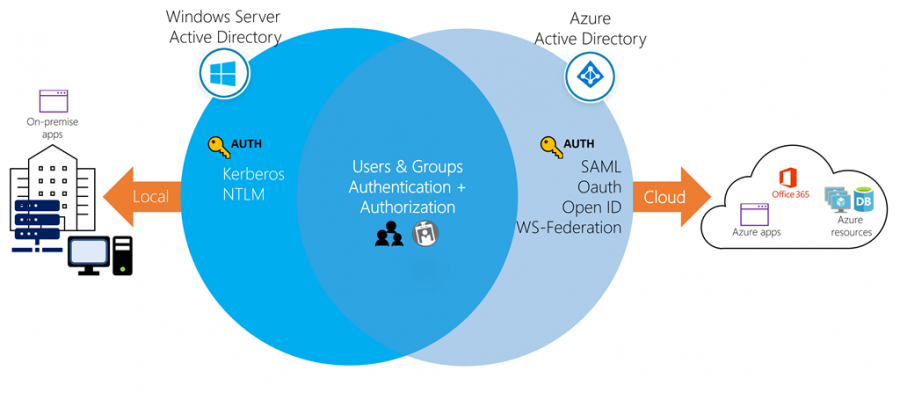
<p><strong>Azure Active Directory (AAD)</strong></p>


<p>Azure Active Directory (Azure AD) is Microsoft’s cloud-based identity and access management service, which helps your employees sign in and access resources. Azure AD is the backbone of the Office 365 system, and it can sync with on-premise ;Active Directory ;and provide authentication to other cloud-based systems, Internal resources, such as apps, intranet via OAuth.</p>


<p><strong>Windows Active Directory</strong></p>


<p>Windows Active Directory lives on-premise in servers called Domain Controllers (DC). Each DC contains a catalogue of users and computers that are authorized to access resources on the network. Users authenticate to DCs via ;Kerberos ;or NTLM authentication.</p>


<p><strong>Azure AD and Windows AD a</strong>re both created by Microsoft, and they are both IAM systems, but that’s pretty much where the comparisons stop. They are fundamentally different systems that exist in an interconnected enterprise environment.</p>


<figure class="wp-block-table"><table><tbody><tr><td> </td><td><strong>Azure Active Directory</strong></td><td><strong>Windows Active Directory</strong></td></tr><tr><td>Communication </td><td>REST</td><td>LDAP</td></tr><tr><td>Authentication</td><td>Cloud-based protocols</td><td>Kerberos and NTLM</td></tr><tr><td>Network Organisation</td><td>Flat Structure of users into groups</td><td>OU&#8217;s, Domains and forests</td></tr><tr><td>Devices</td><td>Mobile Device Management </td><td>No MDM</td></tr><tr><td>Entitlement Management</td><td>Admins organised users into groups</td><td>Admins or data owners assign users to groups</td></tr><tr><td>Desktops</td><td>Windows desktops can join Endpoint management </td><td>Desktops are governed by GPOs</td></tr><tr><td>Servers</td><td>Uses Domain services to manage servers</td><td>Managed by GPOs or On-premise server management system</td></tr></tbody></table></figure>


<p><strong>Directories, Subscriptions and Users</strong></p>


<p>It&#8217;s Important to understand that Azure offers several cloud-based services. All of those services can use Azure AD to identify users and control access.</p>


<p>When a company or organization signs up to use one of these offerings, they are assigned a default ;<em><strong>directory</strong></em>, which is an instance of Azure AD. This directory holds the users and groups that will have access to each of the services the company has signed up for. This default directory is sometimes referred to as a ;<em>tenant</em>. A tenant represents the organization and the default directory assigned to it. </p>


<figure class="wp-block-image"><img src="https://docs.microsoft.com/en-us/learn/modules/manage-users-and-groups-in-aad/media/2-users-subs-and-directories.png" alt="Conceptual art showing users, directories, and subscriptions in Azure"/></figure>


<p>An organization (tenant) always has one default Azure AD directory it&#8217;s associated with, however, owners can create additional directories to support development or testing purposes, or because they want to have separate directories to synchronize with their local Windows Server AD forests.</p>


<p><em><strong>Subscriptions</strong></em> in Azure are both a billing entity and a security boundary. Resources such as virtual machines, web sites, and databases are always associated to a single subscription. If you belong to multiple directories, you can switch the current directory you are working in through the <strong>Directory + subscription</strong> button in the Azure portal header.</p>


<p>Every <strong>user</strong> who needs access to Azure resources needs an Azure user account. A user account contains all the information needed to authenticate the user during the sign-on process. Once authenticated, Azure AD builds an access token to authorize the user and determine what resources they can access and what they can do with those resources.</p>


<p>You use the <strong>Azure Active Directory</strong> dashboard in the Azure portal to work with user objects. Keep in mind that you can only work with a single directory at a time &#8211; but you can use the <strong>Directory + Subscription</strong> panel to switch directories. </p>


<p></p>


<p><strong>Typically, Azure AD defines users in three ways:</strong></p>


<ol class="wp-block-list"><li><strong>Cloud identities</strong> ;&#8211; These users exist only in Azure AD. Examples are administrator accounts and users that you manage yourself. ;</li></ol>


<p>2. <strong>Directory-synchronized identities</strong> &#8211; These users exist in an on-premises Active Directory. A synchronization activity that occurs via <strong>Azure AD Connect</strong> brings these users into Azure. </p>


<p>3. <strong>Guest users</strong> &#8211; These users exist outside Azure. Examples are accounts from other cloud providers and Microsoft accounts such as an Xbox LIVE account. Their source is <strong>Invited user</strong>. This type of account is useful when external vendors or contractors need access to your Azure resources</p>