<p>Microsoft 365 Apps for enterprise is a popular offering. M365 Apps (formerly “Office 365 ProPlus”) delivers an always up-to-date version of Microsoft Office, including AI-based and advanced security features. It ;supports real-time co-authoring in the desktop clients and Microsoft Teams, and also support other tight integrations with Microsoft 365. </p>


<p>Moving to Microsoft 365 Apps significantly reduces IT ability to control the release flow of the Office suite. The increased frequency of updates mean there are fewer features for IT to test and users to learn. However, the burden of regression testing increases. IT must run regression tests for each major update (either every six months or once a year) instead of every several years.</p>


<p class="has-medium-font-size"><strong>Five key benefits ;</strong></p>


<ul class="wp-block-list"><li>Offers tight integration with Microsoft 365</li><li>Real-time co-authoring</li><li>Faster feature update</li><li>AI-driven features that offer users suggestions</li><li>Ability to edit Office documents on Android, Apple iOS and Windows mobile devices.</li><li>Per-user pricing</li></ul>


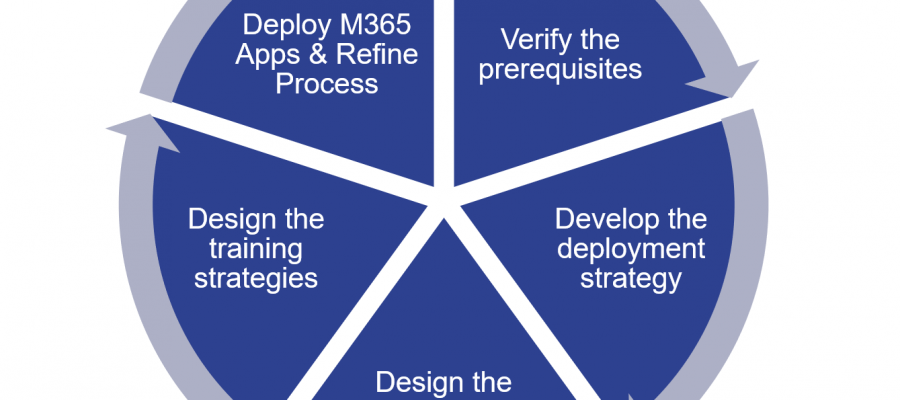
<p class="has-medium-font-size"><strong>Implementing Microsoft 365 Apps in Five phase Sequence</strong></p>


<figure class="wp-block-image size-large is-style-default"><img src="https://www.thecloudxperts.co.uk/wp-content/uploads/2021/01/image-1024x828.png" alt="" class="wp-image-739"/></figure>


<p class="has-primary-color has-text-color">Before rolling out Microsoft 365 Apps, make sure that you are using the production channel that the organization has decided on. This is important, as Microsoft’s default setting exposes you to the least-tested version of Microsoft 365 Apps.</p>


<p class="has-medium-font-size"><strong>Deployment &; Installation Mechanism</strong></p>


<ul class="wp-block-list"><li>For Windows, can use ;Microsoft Endpoint Configuration Manager, the Office Deployment Tool, Remote Desktop Services (RDS), and Microsoft Intune. </li><li>It can also be deployed as part of a Windows 10 image. </li><li>For macOS: can use Intune for managed devices. </li><li>For unmanaged devices: can use the Mac App Store or download from the Microsoft 365 portal.</li><li>For Windows, this is a Click-to-Run install; for macOS, there are PKG files.</li></ul>


<div class="wp-block-wp-quads-adds">
<!-- WP QUADS v. 3.0.5 Shortcode Ad -->
<div class="quads-location quads-ad" id="quads-ad" style="">
</div>
</div>


<h5 class="has-medium-font-size wp-block-heading">It’s a Click-to-Run Installation, Not an MSI Install</h5>


<p>Microsoft 365 Apps’ software installation mechanism on Windows is called Click-to-Run. This mechanism streams the software down to the PC. It initially installs the code that supports basic functionality and then installs the less-used features. Therefore, users can begin using the software within several minutes. If the user clicks on a feature that is not yet downloaded, the system moves the needed code blocks to the front of the download queue. In less than 15 minutes, the system will have installed all of the necessary software.</p>


<p></p>


<p class="has-medium-font-size"><strong>Microsoft 365 Apps updates ;</strong></p>


<p>With Microsoft 365 Apps, you can control how frequently your users receive feature updates to their Office applications. To do so, you choose an update channel for your users. In the Microsoft 365 Apps release model, major updates for Windows arrive every six months. ;A Microsoft 365 Apps release can contain new or updated features, security updates or performance improvements, but they can’t be separated out.</p>


<p class="has-text-color" style="color:#a33100"><strong>Microsoft releases Microsoft 365 Apps updates via “channels.” It offers two test channels for Windows:</strong></p>


<ul class="wp-block-list"><li><strong>Current Channel:</strong> Provides users with the newest features of Office as soon as they&#8217;re ready, but on no set schedule.</li><li><strong>Monthly Enterprise Channel:</strong> Provides users with the newest features of Office only once a month and on a predictable schedule (the second Tuesday of the month)</li><li><strong>Semi-Annual Enterprise Channel:</strong> Provides users with new features of Office every six months, in January and July.</li></ul>


<div class="wp-block-wp-quads-adds">
<!-- WP QUADS v. 3.0.5 Shortcode Ad -->
<div class="quads-location quads-ad" id="quads-ad" style="">
</div>
</div>


<p class="has-text-color" style="color:#984904"><strong>For production releases, Microsoft offers two cadences and four channels for getting new Office product features on Windows</strong></p>


<figure class="wp-block-image size-large is-resized"><img src="https://www.thecloudxperts.co.uk/wp-content/uploads/2021/01/image-2-1024x624.png" alt="" class="wp-image-741" width="839" height="511"/></figure>


<p>The channels are assigned to users, not the enterprise as a whole. This means that enterprises can mix channels according to their business needs. </p>